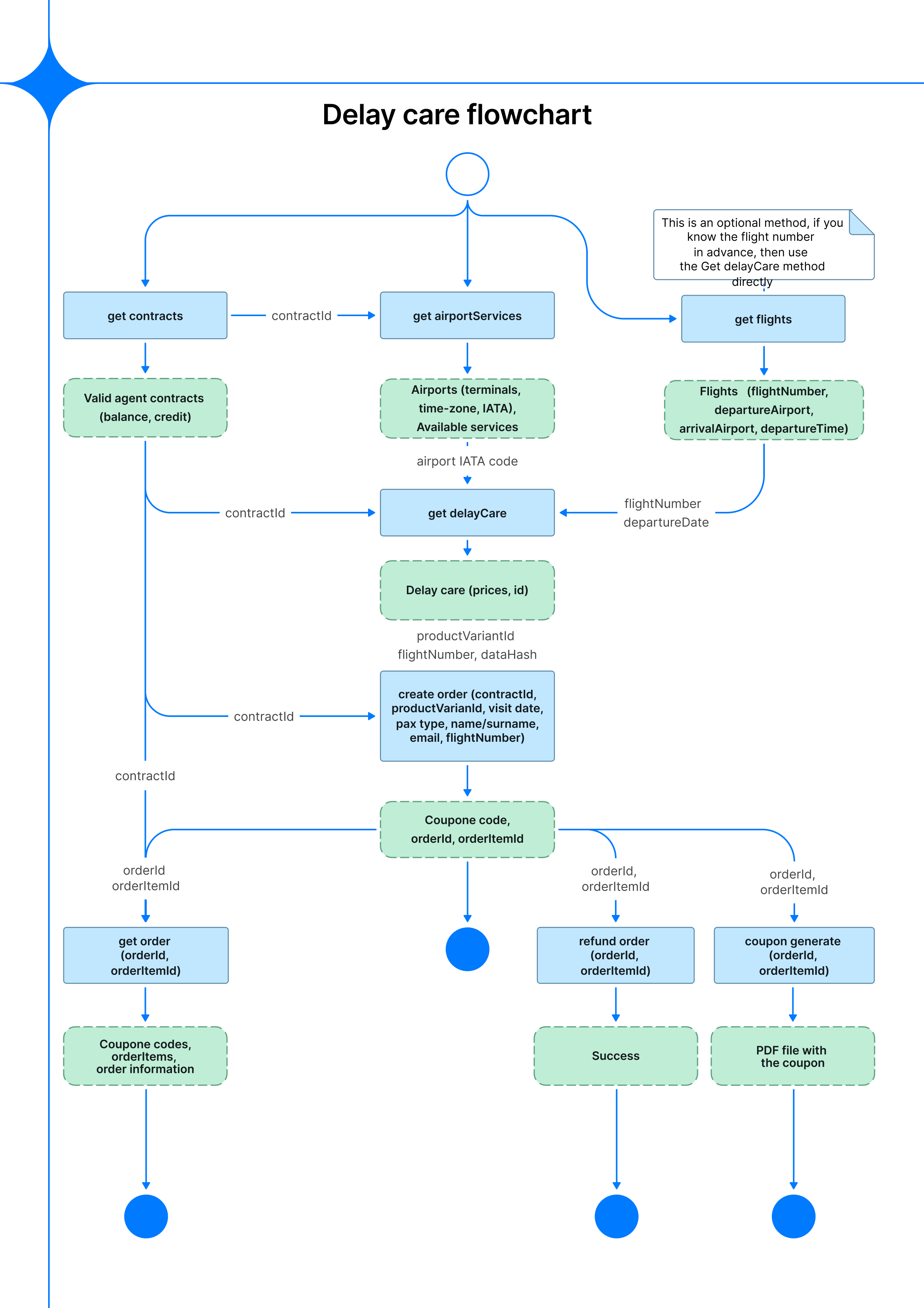
Flowchart
Allows you to offer passengers compensation services when their flight is delayed. Because the service is tied to a specific flight, the flow requires a flight number and departure date — these can either be provided upfront or looked up via getFlights when only a route is known. Once a matching product is found, an order is placed and a voucher is delivered to the passenger.
Sequence diagram
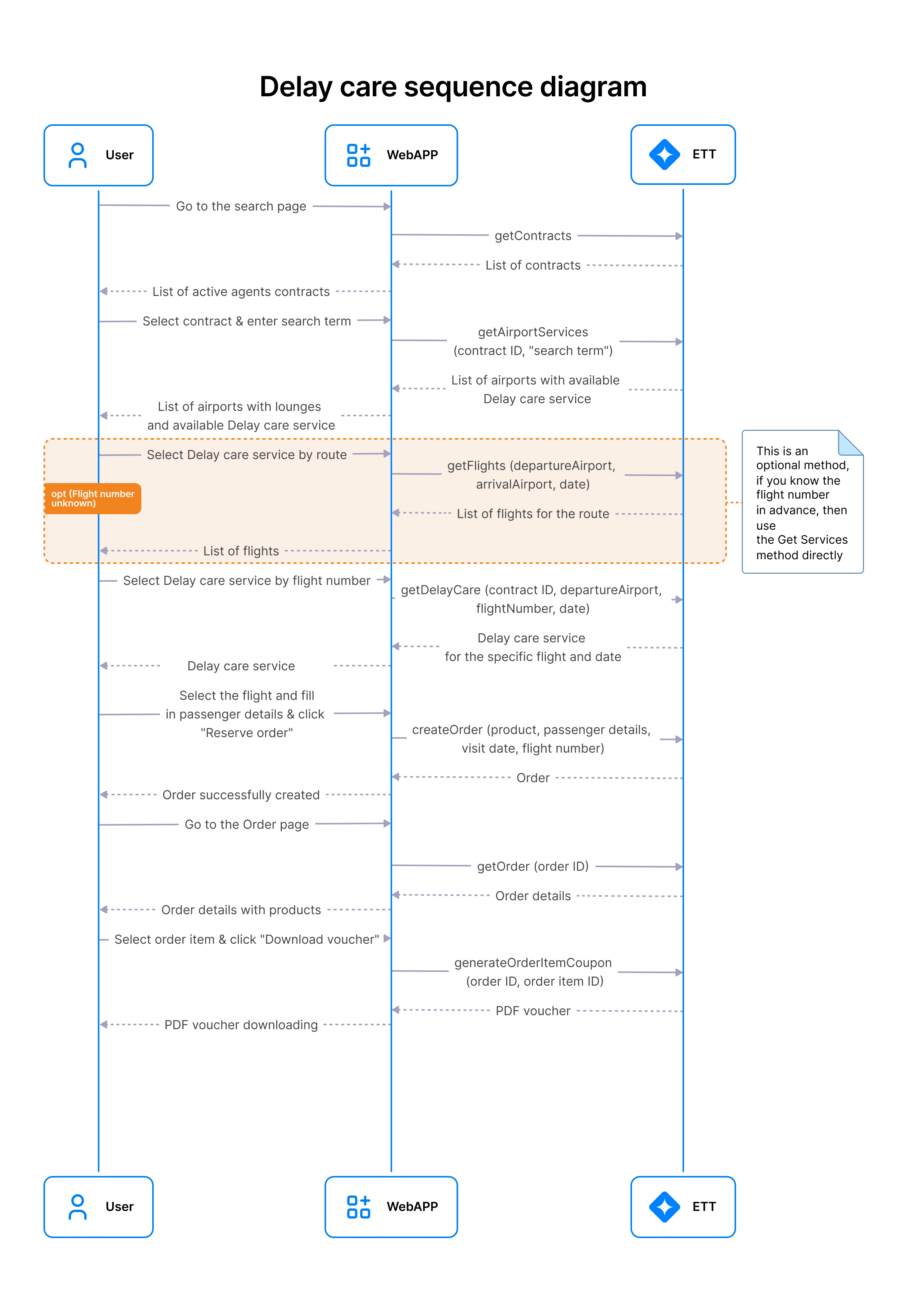
Delay Care search and booking flow
This scenario describes the interaction flow between the client and the ETT API via the WebApp for searching, selecting, and booking Delay Care services, as well as retrieving a voucher.
Overall process logic
The process consists of the following steps:
- Retrieve available contracts
- Search for airports with Delay Care services
- (Optional) Retrieve flights for a specific route
- Retrieve Delay Care services
- Create an order
- Retrieve order details
- Generate a voucher
The WebApp acts as an intermediary between the client and the ETT API.
1. Retrieve contracts
- Method:
getContracts - Description: Retrieves the list of available contracts for the agent.
- Result: A list of contracts available for further operations.
2. Search airports with Delay Care services
- Method:
getAirportServices(contractId, searchTerm) - Parameters:
contractId— selected contract identifiersearchTerm— search query (city, airport, etc.)
- Description: Returns a list of airports where Delay Care services are available.
- Result: A list of airports with available Delay Care services.
3. (Optional) Retrieve flights by route
- Method:
getFlights(departureAirport, arrivalAirport, date) - Parameters:
departureAirport— departure airport codearrivalAirport— arrival airport codedate— flight date
- Description: Returns a list of flights for the specified route and date.
- Result: A list of flights.
Note: This step is optional. If the flight number is already known, the client can skip this step and proceed directly to retrieving Delay Care services.
4. Retrieve Delay Care services
- Method:
getDelayCare(contractId, departureAirport, flightNumber, date) - Parameters:
contractId— contract identifierdepartureAirport— departure airport codeflightNumber— flight numberdate— flight date
- Description: Returns Delay Care services available for the specified flight.
- Result: Delay Care service details for the given flight and date.
5. Create order
- Method:
createOrder(product, passengerDetails, visitDate, flightNumber) - Parameters:
product— selected Delay Care productpassengerDetails— passenger informationvisitDate— service dateflightNumber— flight number
- Description: Creates an order for Delay Care service.
- Result: Order confirmation with
orderId.
6. Retrieve order details
- Method:
getOrder(orderId) - Parameters:
orderId— order identifier
- Description: Retrieves full information about the order.
- Result: Order details and list of items.
7. Generate voucher
- Method:
generateOrderItemCoupon(orderId, orderItemId) - Parameters:
orderId— order identifierorderItemId— order item identifier
- Description: Generates a PDF voucher for the selected order item.
- Result: A downloadable PDF document.