Order items
The Order items section provides a global view of all order items across all orders. This is useful for detailed reporting, filtering, and exporting comprehensive booking data.
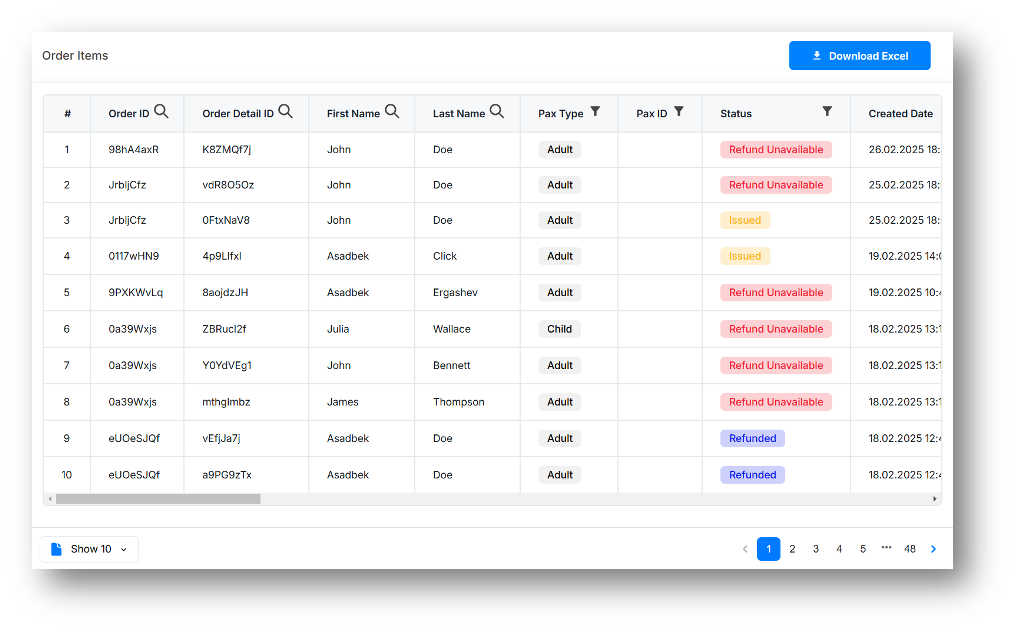
The table displays all order items with the following columns:
- No: Sequential order item number.
- Order ID: Unique identifier for the parent order.
- Order detail ID: Unique identifier for the individual order item.
- First name: First name of the passenger associated with the order item.
- Last name: Last name of the passenger associated with the order item.
- Pax type: Type of the passenger (Adult/Child).
- Pax ID: Identifier of the passenger. Optional field; can be provided during order creation. Its availability is configured per agent contract.
- Contracts: Contract ID associated with the order item.
- Agency ID: Identifier of the travel agency. Optional field; indicated when the order is created via a widget.
- Status: Current status of the order item (e.g., Active, Refunded).
- Created date: Date and time when the order item was created.
- Category: Product category (Lounge / Delay Care / Fast Track / Meet & Assist).
- Order status set date: Date and time when the order item status was last updated.
- Product name: Name of the product associated with the order item.
- Airport code: IATA code of the airport where the product is located.
- Terminal: Name of the terminal where the product is located.
- Product value: Numeric indicator of the stay duration or service quantity.
- Product type: Type of duration or service (e.g., hours).
- Visit date (local time): Planned visit date based on the airport's local time zone.
- Refund expire date: Date and time until which the order item can be refunded.
- Sales currency: Currency code used for the sale.
- Gross price in sales currency: Order item amount in the sales currency.
- Rate to USD: Exchange rate from the sales currency to USD.
- Gross price (USD): Gross price in USD.
- Commission (percent/fixed): Agent's commission on the order item.
- Net price (USD): Net price in USD after commission.
- Net margin (USD): Agent's net margin from the order item in USD.
- Author: User or system that created the order item. Shows the username if placed via the B2B agent portal, or "API" if placed via API.
- Widget ID: Identifier of the widget used to create the order item (if applicable).
- Flight status: Status of the associated flight (Scheduled/Delayed/Cancelled). Shown only for Delay Care order items.
- Flight number: Number of the associated flight. Shown only for Delay Care order items.
Download Excel button
Click the Download Excel button to export the order items table to Excel format.
note
Column filtering is available in all tables, and this filtering will affect the data exported to Excel.